 Skip to content
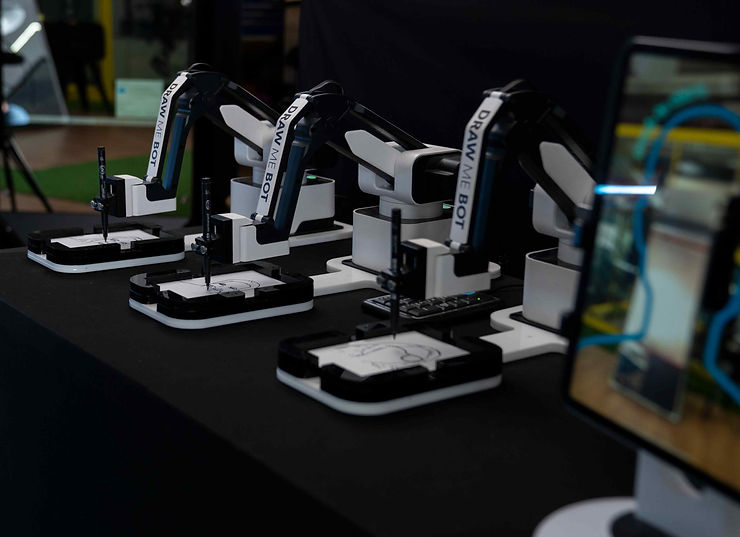
Sketch Robot draw me photo booths use artificial intelligence to transform guest photos into artistic sketches within seconds. These innovative entertainment options combine technology with creativity, offering unique keepsakes that guests can take home immediately or share digitally.
Unlike traditional photo booths that simply capture images, Sketch Robot systems analyze facial features and apply artistic rendering to create personalized drawings. The best models deliver portrait-quality sketches with customizable styles, making them ideal for weddings, corporate events, and parties where memorable experiences matter most.
This guide explains how Sketch Robot technology works, compares leading options, and helps you choose the right setup for your specific event needs.
Transform your events with cutting-edge entertainment. Check our 360 photo booth rental in Boston, MA for immersive guest experiences.
Sketch Robot vs. Traditional Photo Booths: What’s the Difference?
Sketch Robot photo booths stand apart from standard photography setups by using artificial intelligence to create hand-drawn style portraits. While regular booths print photos, Sketch Robot generate artistic interpretations that feel personalized and creative.

Understanding Sketch Robot Booth Technology
The core technology behind Sketch Robot systems involves computer vision and machine learning algorithms. These programs analyze uploaded photos or live camera feeds, identify facial features, and translate them into line drawings or sketches.
Most systems work by breaking down images into key components: face shape, eye placement, nose structure, and mouth position. The AI then applies drawing techniques like hatching, shading, and line weight variation to mimic human artistic styles.
Processing speed has improved dramatically. Early systems took several minutes per sketch, but current models complete drawings in 30-90 seconds. This speed makes them practical for events with multiple guests.
The software can adapt to different artistic styles. Some systems offer cartoon-like renderings, while others produce realistic pencil sketch effects or even caricature exaggerations. Event hosts typically select the style before the event begins.
How Sketch Robot Differs From Traditional Photo Booths
Traditional photo booths capture standard photographs with filters or props. Sketch Robot systems create something fundamentally different: an artistic rendering that feels more personal than a simple snapshot.
The output format sets them apart. Photo booths print instant photos or create digital files. Sketch Robot produce unique drawings that guests perceive as special keepsakes rather than just another party photo.
Interaction time differs significantly. Photo booths need just seconds for a flash and print. Sketch Robot require guests to pose while the system captures reference images, then wait for the AI processing. This creates anticipation and makes the experience more memorable.
Setup requirements vary too. Photo booths need good lighting and backdrops. Sketch Robot systems focus more on camera quality and processing power, with less emphasis on environmental factors since the final product is a drawing rather than a photograph.
The customization options expand beyond typical photo booth capabilities. While photo booths offer filters and frames, SketchBots let you adjust drawing styles, line thickness, shading intensity, and even background elements.

Key Features of the Best Sketch Robot Draw Me Photo Booth Systems
The best Sketch Robot draw me photo booth setups combine speed, quality, and user-friendly interfaces. These features determine whether your event runs smoothly and guests leave satisfied with their artistic portraits.
Processing Speed and Image Quality
Processing speed directly impacts guest experience. Systems that complete sketches in under 60 seconds keep lines moving and energy high. The best models finish drawings in 30-45 seconds without sacrificing quality.
Image resolution matters for final output. Look for systems that produce sketches at minimum 300 DPI (dots per inch) for clear prints. Higher resolution ensures fine details like eyelashes and hair texture appear crisp rather than blurry.
The AI’s ability to handle various lighting conditions separates good systems from great ones. Premium SketchBot technology adjusts for dim venue lighting or harsh overhead bulbs, maintaining consistent sketch quality regardless of environment.
Detail preservation affects how recognizable the final sketch appears. Advanced systems capture subtle features like smile lines, glasses frames, and distinctive facial characteristics that make each drawing feel personalized.
Real-time preview capabilities let guests approve sketches before printing. This feature reduces waste and ensures satisfaction, though it may add 15-30 seconds to the overall process.
Customization and Style Options
Artistic style selection defines your event’s aesthetic. The best systems offer multiple drawing styles: realistic pencil sketch, bold ink drawing, soft watercolor effect, or playful cartoon rendering.
Line weight adjustment controls how thick or thin the sketch lines appear. Heavier lines create bold, graphic results suitable for modern events, while lighter lines produce delicate, classic portraits.
Background customization options include solid colors, patterns, or even removing backgrounds entirely for a clean look. Some systems let you upload custom backgrounds that match your event branding or theme.
Color options extend beyond black and white. Advanced Sketch Robot systems can apply sepia tones for vintage feels, blue tints for formal events, or full color sketches for vibrant celebrations.
Text overlay features let you add names, dates, or event hashtags directly to the sketch. This branding opportunity turns each drawing into a memorable event souvenir.
Filter combinations allow mixing multiple effects. You might choose a realistic sketch style with a subtle color tint and custom background, creating a unique look that reflects your event personality.
Looking for more interactive experiences? Explore our best robot photo booth rental options for automated entertainment.
Top AI Sketch Booth Models & Features Compared
| Feature | AI-Powered Systems | Robotic Drawing Arms |
|---|---|---|
| Processing Time | 30-60 seconds digital rendering | 3-5 minutes physical drawing |
| Output Format | Printed or digital sketch | Physical drawing on paper |
| Portability | Lightweight, compact setup | Requires more space and setup time |
| Customization | Multiple digital styles instantly | Single drawing style per session |
| Maintenance | Software updates only | Mechanical parts need servicing |
| Guest Capacity | 50-100+ per hour | 12-20 per hour |
| Price Range | $800-$2,000 per event | $1,500-$3,500 per event |
Software-Based Sketch Robot Solutions
Pure software solutions run on standard tablets or computers with quality cameras. These systems rely entirely on AI processing without mechanical drawing components.
The main advantage is flexibility. Software updates can add new styles or features without hardware changes. Event hosts can switch between multiple artistic styles throughout the event. Setup simplicity makes software-based options attractive. Most require just a tablet on a stand, a camera, and a printer. This minimal footprint works well in venues with limited space.
Cost effectiveness stands out with software solutions. Without expensive mechanical parts, rental and purchase prices stay lower while still delivering impressive results.
Processing power limitations can affect performance. Older tablets or computers may struggle with complex sketches, leading to longer wait times or reduced quality.
Hybrid Systems With Physical Drawing Components
Hybrid systems combine AI analysis with actual robotic drawing arms that physically create sketches on paper. These setups offer a visible performance element that fascinates guests. The mechanical drawing process becomes entertainment itself. Guests watch as the robotic arm moves across paper, creating their portrait in real-time. This visual spectacle adds value beyond the final product. Paper output feels more authentic than prints. Guests receive original drawings created specifically for them, with slight variations that come from physical pen-on-paper creation.
Maintenance requirements increase with mechanical components. Drawing arms need calibration, pen replacements, and occasional servicing. This adds complexity compared to purely digital systems. Space demands grow with hybrid setups. The robotic arm, its base, and safety perimeter require more floor space than a simple camera and printer arrangement.

Choosing the Right Sketch Robot for Your Event Type
Different events benefit from different Sketch Robot configurations. Matching technology to your specific occasion ensures guests enjoy the experience while meeting your budget and space requirements.
Wedding and Private Event Considerations
Weddings demand elegant, personalized experiences. Choose Sketch Robot systems offering romantic sketch styles like soft pencil or watercolor effects. The output should feel like keepsakes guests will frame rather than casual party favors.
Guest volume matters significantly. For receptions with 150+ guests, prioritize processing speed. Systems completing sketches in under 45 seconds keep lines manageable during cocktail hour or reception downtime.
Branding opportunities let couples add wedding hashtags, dates, or monograms to each sketch. Look for systems allowing custom text overlays and background designs that match wedding colors or themes.
Space constraints in wedding venues require compact setups. Software-based solutions work better than large robotic arms in historic buildings or intimate garden settings where floor space is limited.
Print quality needs to be premium for weddings. Guests may display these sketches in homes, so insist on high-resolution output with archival-quality paper options. Standard photo paper fades over time, while professional-grade paper preserves sketches for years.
Corporate and Large-Scale Event Needs
Corporate events prioritize branding and throughput. The best Sketch Robot draw me photo booth for conferences processes guests quickly while prominently featuring company logos and event themes.
High-volume capability becomes essential. Trade shows or conventions with thousands of attendees need systems handling 60-80 sketches per hour. Multiple stations may be necessary for very large events.
Data collection integration helps marketing teams. Systems that capture guest emails or phone numbers while generating sketches provide valuable contact lists for follow-up campaigns.
Professional aesthetic matters in business contexts. Realistic sketch styles or clean, modern line drawings work better than cartoon effects for corporate branding purposes.
Durability and reliability can’t fail at paid events. Choose established systems with backup equipment available. Technical failures at corporate functions damage reputations and waste client budgets.
Social media integration drives engagement. Systems that instantly post sketches to event hashtags or company social accounts extend marketing reach beyond physical attendees.
Setting Up and Operating Your Sketch Robot System
Proper setup and operation ensure your Sketch Robot draw me photo booth runs smoothly throughout your event. Technical preparation prevents frustrating delays and disappointed guests.
Technical Requirements and Space Planning
Power requirements vary by system. Most need standard 110V outlets, but verify amperage needs. Some setups with multiple printers and lighting may require dedicated circuits to avoid tripping breakers.
Internet connectivity affects certain features. Cloud-based processing systems need stable WiFi for optimal performance. If your venue has unreliable internet, choose systems with offline processing capabilities.
Physical space allocation should include guest queuing area, the booth itself, and a pickup station for completed sketches. Allow minimum 8×8 feet for compact setups, 10×12 feet for systems with physical drawing components.
Lighting conditions impact photo capture quality. While AI compensates for poor lighting, adding supplemental LED panels improves source image quality and reduces processing errors. Position lights at 45-degree angles to minimize harsh shadows.
Backdrop considerations depend on your chosen Sketch Robot type. Pure software systems may not need elaborate backdrops since the AI focuses on faces. However, attractive backdrops enhance the overall guest experience and photo opportunities while waiting.
Table placement affects guest flow. Position the sketch pickup area away from the capture station to prevent congestion. Guests should move from pose area to waiting zone to pickup without creating bottlenecks.
Troubleshooting Common Issues
Processing delays often stem from inadequate computing power. Close unnecessary background applications on tablets or computers running the Sketch Robot software. Restart systems between event shifts if performance degrades.
Poor sketch quality usually indicates lighting problems or low-quality source images. Adjust lighting, move reflective surfaces causing glare, or reposition cameras further from subjects for better full-face capture.
Printer malfunctions disrupt events quickly. Always have backup paper, extra ink cartridges, and cleaning supplies on hand. Learn basic printer maintenance like clearing paper jams and replacing cartridge before your event starts.
Guest posing challenges affect final results. Station an attendant near the capture area to guide guests into optimal positions and ensure they’re looking at the camera rather than a preview screen.
Software crashes require immediate action. Know how to quickly restart the system and whether you’ll lose queued sketches. Some systems save progress, while others start fresh after crashes.
Color matching issues appear when prints don’t match screen previews. Calibrate printers before events using manufacturer instructions. Different paper types absorb ink differently, so test prints with your chosen paper stock.
Pricing and Rental Considerations
Understanding cost structures helps you budget effectively for Sketch Robot entertainment. Prices vary significantly based on technology type, event duration, and included services.
| Service Type | Typical Cost Range | What's Included | Best For |
|---|---|---|---|
| 3-Hour Rental | $3,500 - $6,500 | Equipment, operator, unlimited prints | Small to medium events, 50-150 guests |
| Full-Day Rental | $4,500 - $7,500 | Extended time, equipment, operator, supplies | Large events, all-day conferences |
| Purchase System | $6,000 - $15,000 | Hardware, software licensing fee, training | Frequent event hosts, rental companies |
| Add-On Services | $1,000 | Custom branding, extra printing, digital delivery | Premium event experiences |
Rental vs. Purchase Decision Factors
Rental makes sense for one-time events or hosts planning fewer than 10 events annually. Costs stay predictable, and you avoid maintenance responsibilities. Equipment arrives ready to use and leaves when your event ends.
Purchase becomes cost-effective for event planners, venues, or entertainment companies hosting multiple events monthly. After 6-8 uses, owned equipment typically pays for itself compared to repeated rentals.
Technical support differs between options. Rentals include operator assistance and troubleshooting help. Purchased systems require you to develop expertise or hire trained staff for each event.
Equipment updates happen automatically with rentals. Your provider brings current technology each time. Owned systems may need software upgrades or hardware replacements to stay competitive.
Storage and transportation add hidden costs to ownership. SketchBot equipment needs climate-controlled storage and careful transport. Rental services handle these logistics, removing burden from your operation.
Customization flexibility favors ownership. When you control the equipment, you can brand it permanently with your company logo and configure settings exactly to your preferences.
Need reliable equipment for California events? Check our 360 photo booth rental in Chula Vista, CA for professional service.
Maximizing Guest Engagement With SketchBot Technology
Getting the most value from your Sketch Robot draw me photo booth requires thoughtful planning beyond just setting up equipment. Strategic placement and promotion drive participation.
Promotional Strategies for Events
Pre-event marketing builds anticipation. Mention the Sketch Robot experience in invitations and social media posts leading up to your event. Share sample sketches so guests know what to expect.
Signage at the event entrance directs guests to the Sketch Robot station. Eye-catching displays with example sketches attract attention and communicate that this is more than a standard photo booth.
Staff announcements during cocktail hour or between program segments remind guests about the SketchBot opportunity. Many guests get caught up in conversation and forget to participate without prompts.
Social media integration encourages sharing. Set up instant digital delivery so guests receive sketch files via text or email immediately. Include event hashtags that guests will use when posting their portraits online.
Incentive programs boost participation at corporate events. Offer prize drawings for guests who complete sketches and share on social media, or create contests for most creative pose.
Time-limited availability creates urgency. Announcing “Sketch Robot available for one more hour” motivates hesitant guests who might otherwise skip the experience.
Creating Memorable Guest Experiences
Pose suggestions help shy guests feel comfortable. Display sample poses or have staff demonstrate options. Some guests freeze up when facing the camera, so guidance improves results and confidence.
Group sketch options expand participation. While individual portraits work for most events, offering couple or small group sketches increases the fun factor and encourages friends to participate together.
Live display screens show recently completed sketches. Mounting a monitor near the booth displaying finished drawings creates curiosity among other guests and showcases the Sketch Robot’s capabilities.
Personalization touches make sketches more special. Allow guests to choose from 2-3 artistic styles, or let them select background colors. This decision-making involvement increases emotional connection to the final product.
Physical presentation matters for printed sketches. Provide protective sleeves or small envelopes so guests can safely transport their drawings home. This small detail shows attention to quality and care.
Follow-up digital delivery extends event memories. Email high-resolution sketch files to guests a few days after the event as a pleasant surprise, keeping your occasion fresh in their minds.
Planning the perfect timeline? Read our advice on when to send wedding invitations for seamless event coordination.
Final Thoughts on Choosing Your Sketch Robot Draw Me Photo Booth
Selecting the best Sketch Robot draw me photo booth comes down to balancing technology capabilities with your specific event requirements. Fast processing speeds, high-quality output, and reliable operation form the foundation of excellent guest experiences.
Consider your audience when choosing between realistic sketches and playful cartoon styles. Corporate events typically benefit from sophisticated, professional rendering, while birthday parties and casual celebrations shine with more whimsical artistic approaches. Testing different styles before your event helps ensure the final product matches your vision.
Budget wisely by evaluating total event costs rather than just rental prices. Systems with slightly higher base costs often include features like unlimited prints, digital delivery, and custom branding that separately priced add-ons would make even more expensive elsewhere.
The right Sketch Robot transforms passive entertainment into interactive experiences guests remember and share. When technology works seamlessly and artistic quality impresses, your event stands out from typical gatherings with standard photo booths. Guests take home personalized artwork that sparks conversations and keeps your occasion memorable long after it ends.
Frequently Asked Questions About Sketch Robot Photo Booths
How accurate are SketchBots?
Sketch Robot accuracy depends on the AI quality and source image resolution. Premium systems capture facial features with 85-95% accuracy, creating recognizable portraits that clearly resemble the subject. Factors affecting accuracy include lighting conditions during capture, guest pose quality, and the artistic style selected.
Which is the best photo booth?
The best photo booth depends on your event type and priorities. For artistic output,Sketch Robot systems excel by creating unique keepsakes beyond standard photos. Traditional photo booths work better when you need instant high-volume throughput with minimal wait times. 360-degree booths provide immersive video experiences but require more space and setup time. Mirror booths offer interactive touchscreen experiences with instant prints. prioritizing memorable keepsakes, SketchBot technology delivers exceptional guest satisfaction.
What’s the easiest photobooth app to use?
Simple Booth leads in user-friendly operation with intuitive touch controls and minimal setup requirements. The interface guides guests through the entire process with clear prompts and preview screens. For Sketch Robot specific applications, systems built on iPad platforms generally offer the smoothest experiences with familiar touch gestures and clear visual feedback.
What is the average cost of a 360 photo booth?
360 photo booth rentals typically range from $800 to $2,000 for a standard 3-4 hour event, with full-day bookings reaching $1,500 to $3,500 depending on location and included services. Premium packages with custom branding, props, and extended time push costs higher.
What are common problems with 360 booths?
Synchronization issues between multiple cameras cause the most frequent technical problems, resulting in choppy or misaligned video output. Lighting challenges in venues with dim ambiance or harsh overhead lights create exposure inconsistencies across the 360-degree rotation. Platform wobble from uneven surfaces or guest movement during capture produces shaky, disorienting videos.